 cadeo
cadeoguides / understanding your scores
Understanding your scores
One rule governs every number in Cadeo: if the data isn't there, the score says so — it never fills the hole with a guess. A dash you can trust beats a number you can't. That's why new accounts see "calibrating" instead of a made-up 75.
Recovery
The morning verdict: how ready your body is today, from your overnight heart data (HRV and resting heart rate versus your own baseline), last night's sleep against your personal need, recent training load, and your morning check-in. It compares you to you — not to a population chart.
How it's calculated
- HRV — last night versus your own ~60-day baseline and its normal spread. Being a little below your norm is different from being far below it, and the score knows the difference.
- Resting heart rate — versus a baseline built from two windows of your history, so one odd week can't drag your norm around.
- Sleep — last night against your personal need (see below), not a universal 8 hours.
- Training load — the ratio of your recent short-term load to your long-term base, built from every run's duration and intensity. Above your base = recovery has more to pay for.
- Your check-in — heavy or fresh legs nudge the verdict; the engine treats what you say as a real signal, not decoration.
The weights between these shift with how much data you have — a sparse week leans harder on what's reliable. The result maps to the color bands you see (green / yellow / orange / red), and a band only worsens two steps in a day when the signals agree twice.
No HRV? You still get a score
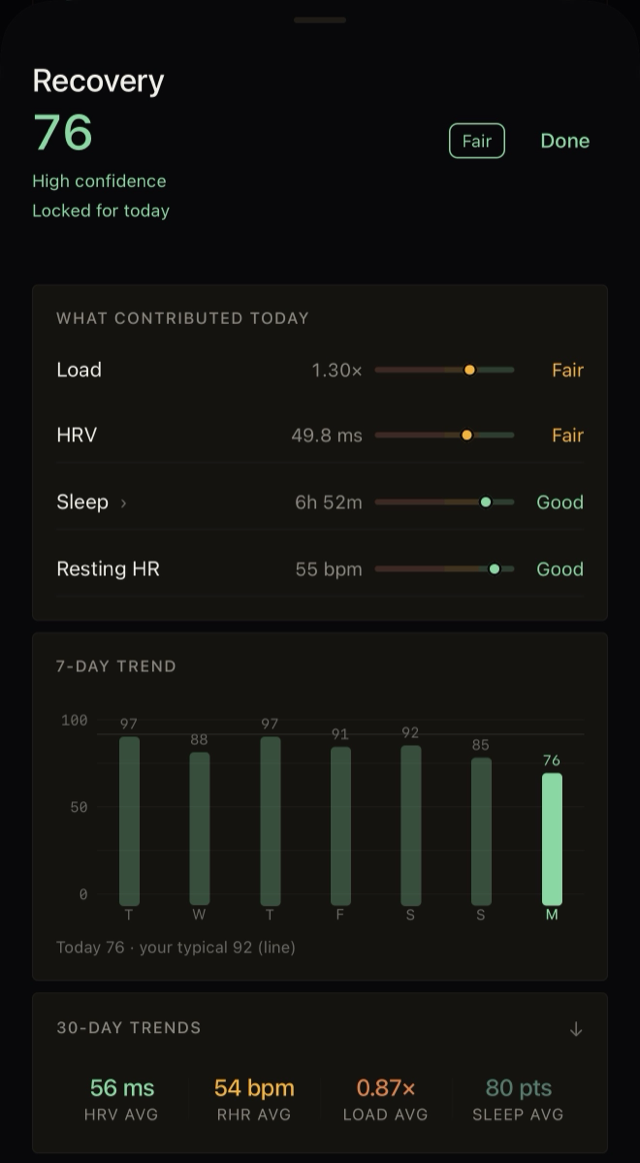
Reading the recovery drilldown
- The header — score, the band word (Fair), how much data stands behind it (confidence), and locked for today once the morning's overnight signals are in.
- Contribution rows — each signal shows today's raw value and a dot on a spectrum: the dot's position is where today sits relative to your own normal range, and the word is the verdict. Read the words, not the decimals — one "Fair" row doesn't make a bad day; it tells you which lever is loaded.
- Load's number — 1.30× means your recent training load is running 30% above your long-term base. Near 1.0 is training at your norm; well above it is why recovery asks for more.
- 7-day trend — each bar is a morning's score; the faint line is your typical (a ~30-day median), so today reads against you, not against 100. A 76 under a 92-typical line says "off day for you," which matters more than the absolute number.
Why it says 'calibrating'
One more honesty rule: once the morning's verdict is set with full overnight data, it locks for the day — it won't quietly rewrite itself at 2pm. The exceptions announce themselves (a late sleep sync, or your own check-in changing the picture).
Sleep
Last night against your need — learned from your own history, not a flat eight hours. Short nights show up here first, and a run of them starts showing up in recovery.
The parts of the score
- Duration vs your need — the core of the score. Your need starts from the typical night in your own history and grows while you're carrying debt.
- Sleep debt — a rolling week of nights versus that need. Behind by hours? The score says so and your need temporarily rises until it's repaid; older debt decays rather than haunting you forever.
- Stage mix — deep / REM / light for each night, shown in the drilldown so you can see why two equal-length nights scored differently.
- Latency — how long you took to fall asleep, shown for context without punishing the score.
- Garbage-proofing — absurdly short records (a broken sync, a nap logged as a night) are treated as invalid, not catastrophic.
How this differs from most sleep scores: Whoop, Oura, and watch-native scores grade you against population models — a fixed 8-hour ideal, universal stage percentages. Cadeo grades you against you: your need, your debt, your history. Two honest consequences: a natural short sleeper isn't permanently "poor," and a score in the 70s is your normal, not a failing grade — beating your own norm is what earns the high end.
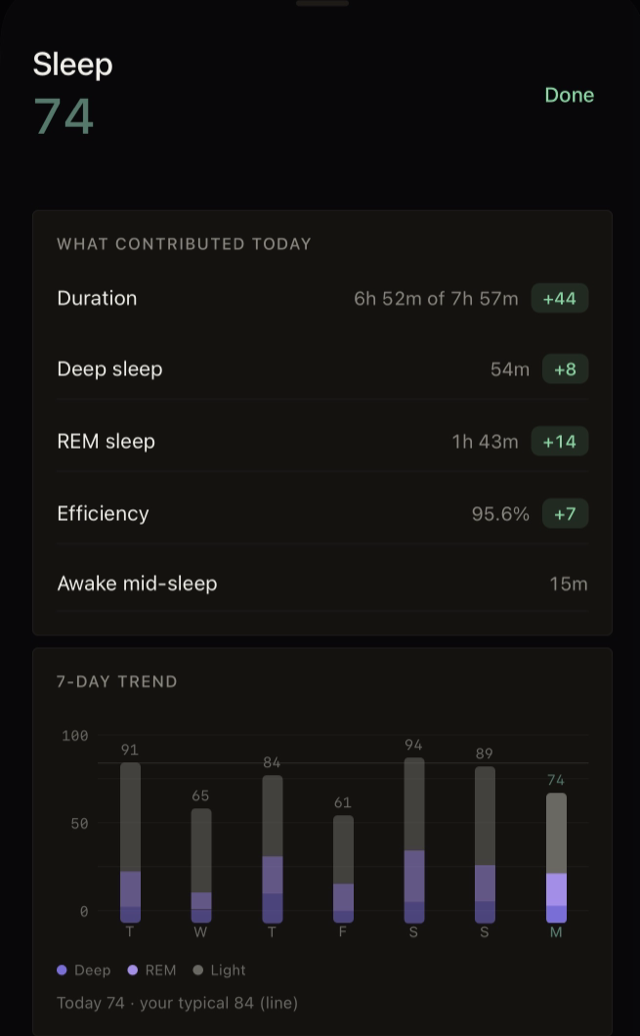
Reading the sleep drilldown
- The green chips are points — how much each part added to the score. Duration carries the most weight; deep, REM, and efficiency add on top. Awake time is shown for context without a penalty chip.
- "6h 52m of 7h 57m" — the second number is your need, not a universal 8 hours. It grows while you're carrying debt, which is why it moves week to week.
- The stacked bars — each bar's height is that night's score; the colors inside are the stage mix (deep, REM, light), so two equal-height nights can look different inside. The faint line is your typical.
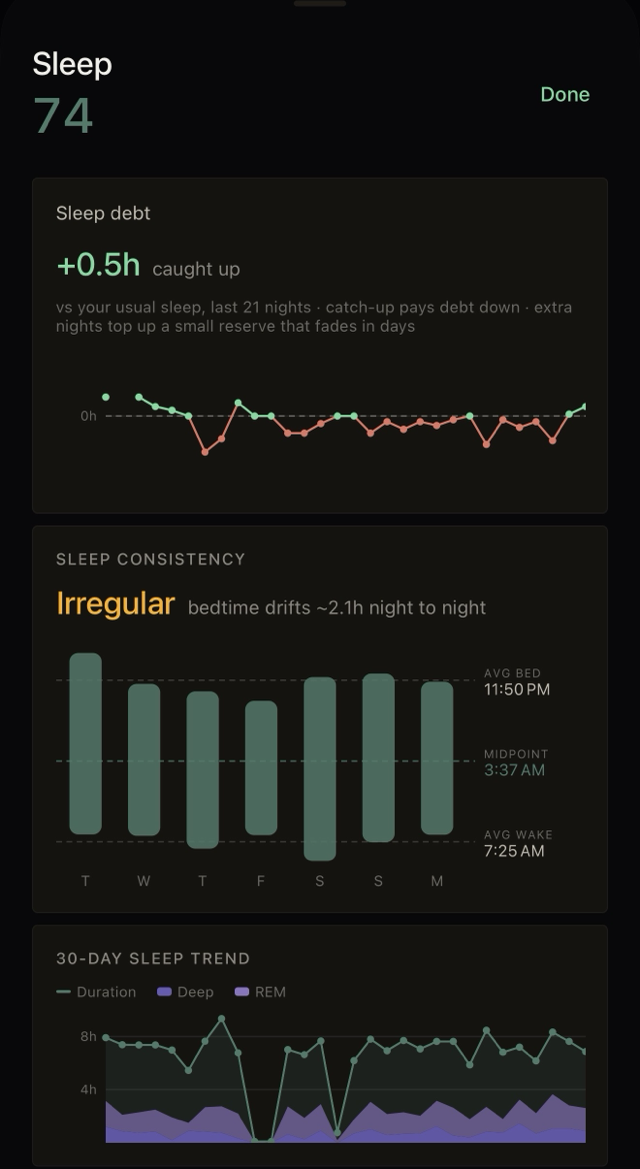
Reading debt & consistency
- Sleep debt — every dot is a night versus your usual, over the last 21: red below the line is borrowed sleep, green above pays it down. Catch-up works — "+0.5h caught up" means you're ahead — and extra nights top up a small reserve that fades in days rather than banking forever.
- Consistency — each bar spans bedtime to wake; the dashed lines mark your average bed, midpoint, and wake. The verdict word ("Irregular · drifts ~2.1h") is about timing, not length: a drifting midpoint disrupts sleep quality even when the hours add up.
- 30-day trend — the line is nightly duration; the purple area under it is the deep + REM share. Gaps are nights nothing tracked — shown as gaps, never filled in.
Seeing a dash (—) instead of a number? Nothing is tracking your sleep. The sleep score needs a watch or sleep tracker writing to Apple Health, same as recovery — no tracker, no number, and Cadeo won't invent one.
Exertion
Yesterday's strain: how hard the engine believes yesterday actually was. How it's calculated: each workout earns a training impulse from its duration and intensity — time spent in higher heart-rate zones (anchored to your threshold, not a generic max) counts much more than easy minutes. The day's total maps to the 0–100 score, resets daily, and rolls into the load side of this morning's recovery.
Running efficiency
The long game: heart rate versus pace on your easy and long runs, tracked over weeks. Fitness improving means the same pace costs fewer beats.
How it's calculated: each eligible run's steady portion is reduced to how much heart rate its pace cost, adjusted for the day's weather (a muggy morning is priced in before you're judged), and compared to your own 30–60 day baseline. Only steady easy and long runs with clean heart-rate data qualify — intervals, races, and HR-less runs are excluded and labeled as excluded, because a polluted trend is worse than a shorter one. Excluded runs whose data arrives late re-enter on their own.
Goal forecast: "Now" vs "Reach"
On Today, the goal forecast shows two numbers. Now is what your current fitness predicts you'd run on race day. Reach is your stated goal. The gap between them is the training block's job.
How it's calculated
Why it matters: the honest gap drives real decisions — what pace to trust on race day, whether the goal needs more runway, and when a tune-up race would sharpen the picture. Early on it says "Need more data" — the forecast refuses to speak until a couple of weeks of real runs give it something honest to say.
Zones that move with you
Heart-rate zones in most apps are fixed percentages of a max you entered once — a table that doesn't know you got fitter. Cadeo anchors zones to your lactate threshold (LTHR) — the effort you can hold for about an hour — because that's the line that actually separates sustainable running from borrowed time.
How it works
- Estimated from your real efforts — races and tempo runs, not a formula off your age. Know your LTHR from a lab or your watch? Enter it in Profile and Cadeo anchors on your number.
- Every zone derives from it — easy, aerobic, threshold, and hard work all sit at effort-true positions relative to your threshold, so "easy" means genuinely easy for you.
- Races re-anchor it — prove your threshold moved and every zone shifts with it, announced in plain words ("your race moved your threshold — zones shift up 18 bpm").
- History keeps its era — old runs are judged by the zones that were true when you ran them, so past efforts don't get silently re-graded.
Why it matters: zones are how the app decides whether your easy run was actually easy and whether your workout hit its target. Anchor them wrong and every verdict downstream inherits the error — which is exactly why Cadeo treats a moved threshold as news worth announcing.
Why gaps beat guesses
Most training apps fill missing data with population averages and present the result as yours. Cadeo's engine was built the other way: every score carries its inputs, missing inputs are flagged, and anything the engine re-reads or revises tells you so in words. When a number does show up, you can act on it.
keep reading
- How Cadeo coaches →
how the scores turn into what you're told to run
- Integrations →
recovery needs overnight watch data — make sure it's flowing
- Troubleshooting →
recovery never scoring? runs missing? the fixes, in order
Not running with Cadeo yet? The beta is live — leave your email and I'll send your TestFlight invite.
Stuck? Reply to any Cadeo email and a human will get you sorted.
← All guides